Check your eligibility and apply for Checkpoint
Entry Criteria
Learning Objectives
Welcome to the Checkpoint.
You must apply to join the Checkpoint. If you meet the eligibility criteria, you will be invited to join the next run of this module.
You will receive a technical test within two days of your application. You must complete the test within 7 days of receiving it. The test will take up to one hour.
The technical test will require you to write code. It’s like on Codewars. There will be some existing code you have to modify, and you will have up to one hour to do the task. You must pass the technical test. If you fail the technical test, you will be allowed to apply to the next Checkpoint if you want to.
If you are accepted, you will receive an enrollment email.
If you are not accepted, you will receive an email explaining why. If you remain eligible to apply, you will be able to apply to the next Checkpoint if you want to.
If you have been accepted, please now continue…
Goals
Learning Objectives
Welcome to the Checkpoint.
Your goal is to build two group projects and one solo project over the next 22 days. For each project, your goal is to:
- 🎯 Build a complete project that meets all of the requirements, including tests.
- 🎯 Build a complete understanding of all the code in your project, because you will be asked to explain it.
Our goal is to find people who are ready to train in the Software Development Course. This means we are looking for people ready to begin working as a professional software engineer within the next 16 weeks. This is why we are looking at your ability to:
- 🎯 Work in a team to build working software with tests.
- 🎯 Write simple code independently.
- 🎯 Explain your work to others in English.
These are the core goals of the Checkpoint.
Expectations
Learning Objectives
Trainees, we expect you to:
- Check Slack at least once a day and respond to any messages.
- Work in groups and individually, in class and during the week.
- Show up on time and participate in all activities, including helping others.
- Complete the projects in the way they are specified.
- Not over-focus on styling. We often see trainees fail because they spent most of their time working on beautiful CSS, but then not complete the project. Don’t make this mistake. You’re allowed to style things as much as you want, but won’t get any credit for doing so.
- Do your best.
Trainees, you can expect:
- Your team to work with you to complete the projects.
- A fair assessment, explained clearly.
- Help from volunteers and other candidates with your logistical blockers.
We expect everyone to:
- Follow the Code of Conduct.
- Help each other.
- Do the prep.
💬 Right! The Checkpoint has 3 working weeks and one assessment day, making 22 days in total.
💬 The SDC is 12 weeks, but the Checkpoint is shorter
💬 The Checkpoint is 3 weeks long, but there are 22 days in total including the assessment day.
Programming Prerequisites
Learning Objectives
Check your understanding.
Before you join the Checkpoint, you should have a secure understanding of a limited subset of programming concepts at a junior level. The projects, activities, and interviews are designed for people who have a working knowledge of the following foundational concepts:
JavaScript fundamentals
- Variables:
let,const - Primitive data types:
String,Number,Boolean,undefined,null - Data structures:
Array,Object - Navigating Objects:
Object.entries,Object.fromEntries,Object.keys,Object.values - Navigating Arrays:
Array.includes,Array.slice - Operators:
=,==,===,!=,!==,>,<,>=,<=,&&,||,!,%,+,-,*,/ - Control structures:
if,else,else if,return - Functions:
function,=>, scope, callbacks, and extracting a function - Loops:
for,for of - Higher order functions that take callbacks:
Array.map,Array.filter,Array.find,Array.findIndex
JavaScript in the browser
- Asynchronous programming:
Promise,async/await - Web APIs:
fetch,addEventListener,setTimeout,document - Manipulating the DOM with Web APIs: Finding elements, Creating elements, Adding elements to the DOM, Removing elements from the DOM, Changing elements currently in the DOM
JavaScript Testing
- Assertions in Jest:
test,expect,toEqual,not
Git
- Git commands:
status,clone,add,commit,push,pull,merge,branch,checkout
Help
Learning Objectives
🧭 Make sure you have everything you need to come to class and do your work. Everyone at CYF has barriers to education, and we can help with some things. If you cannot come to class because you can’t afford:
🧒 Childcare
then go to 🧭 signposts/childcare
💻 A computer or broadband
then go to 🧭 signposts/equipment
🚌 Bus or train tickets
then go to 🧭 signpost/transport
🥪 Food
will be provided
💬 No, we work in teams.
💬 No, your team can help you too.
💬 Yes, a good developer builds understanding by asking and answering good questions.
💡Remember
We all help each other at CYF. We are a community.
You are not competing against each other for limited number of places. We will accept everyone who meets the success criteria.
- You should ask for help
- You should help others
Group work
When you’re working on group projects, we expect you to be working together. This starts with the planning stages of any project, where you should be engaging directly with your team to break down the project into tasks and allocate work between the members of the team.
You can work on code on your own, but we expect you to be aware of what each other is working on. At your interview, you may be asked about any code in your project, including code someone else wrote.
We strongly recommend that you collaborate as you go. Read and discuss each other’s code as you’re building. Do not wait until the end of the project (or the week before the interview). The best way to ensure you maintain that collaborative effort is to use proper branching practices and review each other’s pull requests for every new feature that is being implemented.
Another way you may choose to collaborate is with driver/navigator pair programming. This is a very common industry practice that can help improve your learning and give you a deeper understanding of the codebase as it is being written. This is not a requirement, but you may want to discuss in your group whether it is something you want and are able to do during the project.
Prep
Double-check you have everything you need to start the Checkpoint.
- You have applied to the Checkpoint and received an enrollment email
- You have joined the CYF Slack where the Checkpoint is hosted, and filled out your profile
- You have a suitable laptop and internet access
- You have organised childcare if you need it
- You have signed the Code of Conduct
- You know how to get to class
- You have read and understood the success criteria
If you need help with any of these, ask in Slack or go to the Signposts website.
Now go read over the day plans, backlogs, success criteria and complete the quiz. You can do it! 🚀
💬 No, it’s a mistake to be late for class.
💬 Yes, you should be ready to begin at 10am.
💬 No, you must come to class in person and on time.
💬 Yes, sign the register as soon as you come in.
💬 No, you should sign the register first.
💬 No, you should sign the register first.
Project Submission
Learning Objectives
For all projects in the Checkpoint:
- The project must be written in JavaScript.
- The project must be in its own repository. That repository must not contain other projects. Do not fork this
CodeYourFuture/Checkpointrepo - make a new repository for your project.- There should not be any dead code or unused code in your repository. All code should be used, all tests should run and pass.
- For team projects, all members of the team should work in the same repository.
- There is some supplied scaffolding for all projects. You may copy this from The Checkpoint repository. You should remove any content that doesn’t apply when you use it (e.g. there shouldn’t be any comments saying “This is an example” or “This is a placeholder”).
- You are expected to write at least one non-trivial test for each project.
- Non-trivial means that the test must test something that could go wrong, and matters to the project. So it a test which shows that calling
getUsers()returns 5 users would not be non-trivial. But testing that, say, entries are sorted correctly before being presented to the user is non-trivial. - You are not required to test via the DOM. You may choose to. But you can pass the Checkpoint without writing a single test involving the DOM.
- We will try running your tests by running
npm i && npm test. This must run your tests and they must all pass. Make sure you’re not relying on globally installed packages - someone on a fresh computer with onlynpminstalled and no packages installed must be able to run the above command and have it work. - Make sure you include your
package.jsonfile in the project, ornpm testwon’t work. - Make sure that
npm testactually runs your tests. - Your tests must test code actually used in your project. You must not copy+paste the code into the test itself, but must import the code into the test file.
- Non-trivial means that the test must test something that could go wrong, and matters to the project. So it a test which shows that calling
- You have a copy of the rubric for each project - this is how we will test your project. Your project must meet all criteria in order to pass. We highly recommend that you run through the test steps yourself just before submitting the project.
- We expect you to include a file named
TESTING.mdin your repository. For each rubric point, you should include an entry in yourTESTING.mdexplaining how you tested that rubric item.- For at least one rubric point, the answer must be “Unit tests in
[some filename]”.
- For at least one rubric point, the answer must be “Unit tests in
- You will get instructions for when and how to submit your projects on Slack.
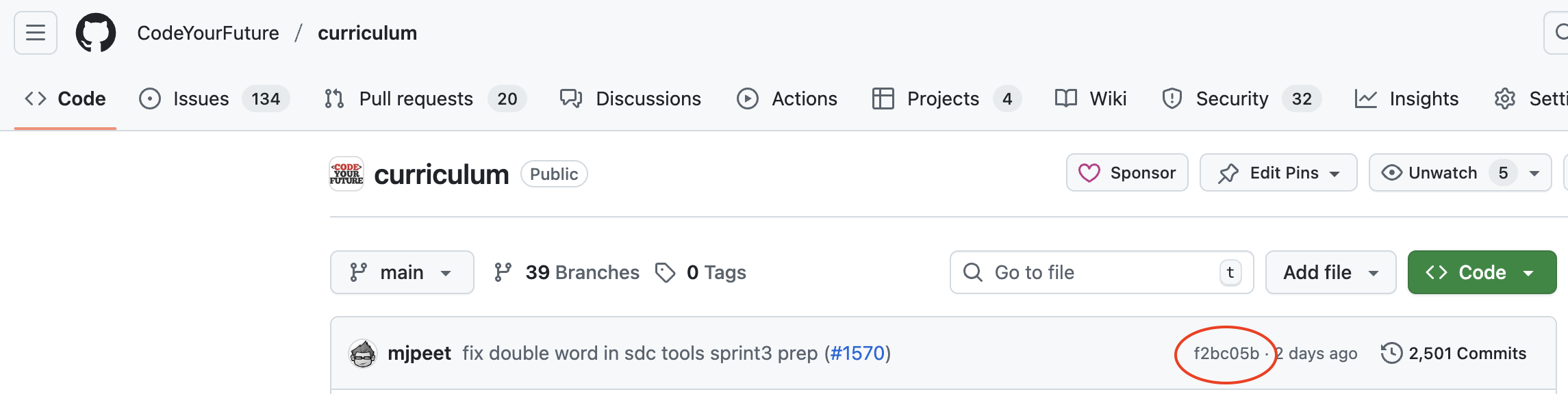
- When you submit your project, you must include the git sha of the commit you’re submitting. You can get this by going to your project in GitHub, and looking at the latest commit (see screenshot below). If you want to submit a different sha than the latest one, you can open the list of commits, and copy the sha associated with that commit.
- Once you submit your project, any changes you make after will be ignored for assessing the project. Do not submit the project until you are sure it’s complete.
- Test your project against the rubric before submitting your project.
- Your code must be correctly indented. This means that each line after a
{should be consistently indented one more level, and a}triggers one level less of indentation. - You should not collaborate with anyone else in your individual project. If there are signs you didn’t write your own code for your individual project, you will fail.
Pre-Checkpoint Briefing
Before the Checkpoint starts, there will be a meeting to brief you on how the Checkpoint works, and answer any questions.
You will be notified on Slack when this meeting will be.
For trainees
Before the meeting, think about any questions you have. What are you not sure about?
Make sure you attend the meeting.
For volunteers
Make sure to answer the following questions during the briefing.
- What is the schedule of Checkpoint? When are people expected where?
- Demos happen on the first three Saturdays - they are expected to be available online/in-person from 10am-5pm and will be notified when demos are happening.
- Projects begin on each Saturday and are due in the following Thursday - they have six days to complete them, and should be available for communication from their team during this period.
- Note: The intended structure of Checkpoint is three consecutive weeks of work but this may be affected by bank holidays or other events, so check with the edu team about the possibility of any changes before delivering this briefing
- When are trainees expected to show up in person or on calls?
- As alluded to above, for each of the 3 Saturdays they should be fully available online/in-person from 10am-5pm.
- They will be notified in advance whether their Saturday sessions will be handled remotely or in-person.
- This expectation is a requirement of passing Checkpoint, we will try to accommodate extenuating circumstances if they let us know with ample advance but generally trainees will not pass Checkpoint if they don’t attend as requested.
- What should people do before the first session?
- In their own time, they should work through the preparation steps to ensure everything is covered.
- Make sure to explain the prep for the first demo; all other demos will be about Checkpoint projects, this one will be based on something they’ve already done (e.g. in ITP).
- What’s expected of trainees in the first session, and in the first week?
- They must deliver a demo and be prepared to engage in their first group project.
- How should trainees be working as a team?
- Plan together - Outside of the demo slots on a Saturday, they are expected to be working and planning with their group.
- Work together - They may want to work on code their own, but they should be aware of, communicating about, and reviewing the work done by the rest of their team. They may be asked about any of the code in their project during the interview and they should be able to explain it!
- Pair programming [optional] - Working together as driver and navigator is not required, but can be a really useful tool for productivity and collaboration.
- How will trainees be assessed?
- Projects - A passing project must meet the rubric points listed for the specific project, as well as the project submission guidelines which apply to all three. They must pass their solo project and at least one of the two group projects. Note: projects are not marked for their styling, so CSS should be minimal and only serve to achieve basic usability and accessibility of the app.
- Demos - Checkpoint demos are different from those they did in ITP, they are marked against a very specific rubric. To pass, they must hit five of the six rubric points. They will be given up to 3 chances to deliver a passing demo, and they must pass at least one.
- Interview - The interview will take 15 minutes, and they will be asked three questions during it. They should be prepared to be asked about code and/or feature of any of their submitted projects, including code they themselves did not write.
- How do trainees hand in their projects?
- Instructions for handing in projects will be given on Slack - pay attention!
- Generally they amount to sharing a link to the repo, the hosted version of the app, and a GitHub SHA of the relevant commit from which we want to mark the project.